

How-to1 min read·Updated Nov 2, 2026
Set up your agency profile and branding
Name, logo, colours, contact details and the defaults every PDF and email will use.
Requires permission
agency.settings.brandingYour agency profile feeds everything customers see: the login page, the client and owner portals, PDF headers, email footers and the public website. Set it once and every document inherits it.
- Open Settings → General. Enter the agency name in both languages, the legal name, tax registration number, phone, email and address. These appear on invoices and contracts.
- Choose the default currency, timezone and fiscal year start. The currency is used for all new invoices; the timezone decides when scheduled reminders go out.
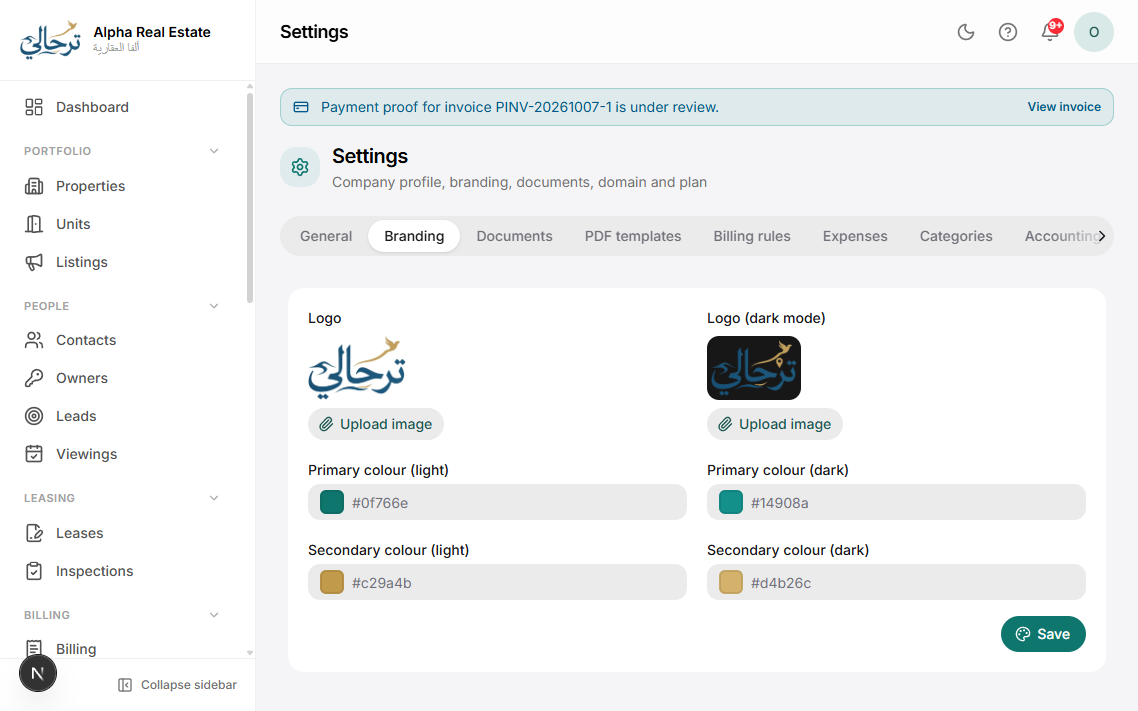
- Switch to Settings → Branding. Upload a square logo (PNG/SVG, transparent background works best) and optionally a wide logo for PDF headers.
- Pick your primary colour. Buttons, links and PDF accents follow it. Use the live preview on the right to check contrast in light and dark mode.
- Press Save. Changes apply instantly to the dashboard and to new PDFs; already-generated PDFs are not regenerated.
Fill in both the English and Arabic agency names — PDFs are dual-language and show both, and WhatsApp messages use the one matching the recipient's language.
Your public web address (yourname.boyoti.com) is set when the agency is created. To use your own domain see Connect a custom domain.
Was this article helpful?
Related articles
Choose PDF templates and stylesHow-toProfessionalPick a layout and colour style for invoices, receipts, contracts, statements and payslips — with live preview.1 min readConnect WhatsApp and emailHow-toProfessionalEnable the WhatsApp Business channel and a branded email sender so every notification reaches clients.1 min readConnect a custom domainHow-toUltimateServe your website and portals from www.youragency.com with automatic HTTPS.1 min read