

How-to1 min read·Updated Nov 2, 2026
Add your first property
Create a building, villa compound or land plot, and link it to its owner.
Requires permission
agency.properties.createA property is a physical asset — a tower, a villa compound, a warehouse or a plot. Units live inside properties. Create the property first, then add its units.
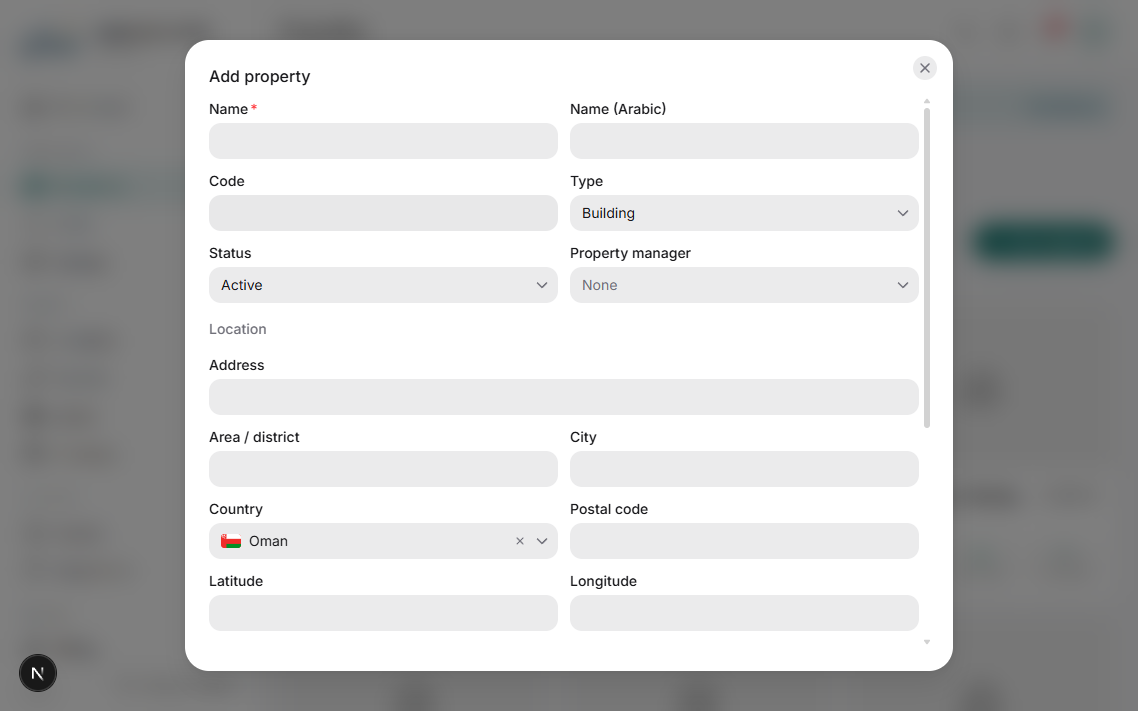
- Open Properties and press New property.
- Enter the name (both languages), the type (residential, commercial, mixed, land…) and the ownership: managed for an owner, or owned by your agency.
- Set the address and drop a pin on the map — the location is reused on listings and in the client portal.
- Add optional details: year built, number of floors, parking, amenities, and documents such as the title deed.
- Save. You land on the property page with tabs for Units, Leases, Finance, Maintenance, Documents and Activity.
If the property belongs to a client owner, create the owner contact first (Owners page) so you can select it here. Linking the owner is what powers owner statements and the owner portal.
Property-level expenses, utility bills and management fees are all tracked on the Finance tab of the property, which rolls up into the owner statement.
Was this article helpful?
Related articles
Add units manually or import from ExcelHow-toCreate units one by one, generate a batch, or bulk-import hundreds from a spreadsheet.1 min readProperties and units — the data modelConceptHow properties, units, owners, leases and invoices relate to each other.1 min readCreate an owner and assign their propertiesHow-toBasicOwners page: profile, management fee, bank details and the properties you manage for them.1 min read