

Welcome to Boyoti — a tour of the dashboard
What each section of the sidebar does and where to find things.
On this page
Boyoti is organised the way an agency works: portfolio first, then the people you deal with, then the paperwork and money that follow. The sidebar is grouped into sections, and every section is gated by your role, so you may see fewer items than shown here.
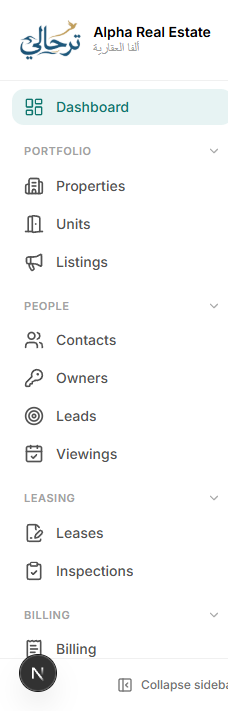
| Section | What lives there |
|---|---|
| Overview | Home dashboard with KPIs, due invoices, expiring leases and open requests. |
| Portfolio | Properties, Units and public Listings. |
| People | Contacts (tenants, buyers, guarantors), Owners, Leads and Viewings. |
| Leasing | Leases and move-in / move-out Inspections. |
| Billing | Invoices, payments, cheques and your money Accounts. |
| Operations | Maintenance, Tasks, Utilities, Expenses, Vendors and Inventory. |
| Sales | Reservations, sale contracts, handovers and snag lists. |
| Workspace | Communications, Documents & templates, Reports, Website and this Help Center. |
| Administration | Team, Staff, Payroll, Roles, Audit log, Plan and Settings. |
The top bar
The top bar has global search (Ctrl + K), the language switch (Arabic / English with full right-to-left layout), notifications, the ? help button that shows articles for the page you are on, and your profile menu.
Everything in Boyoti is bilingual — switch the language from the top bar at any time; your choice is remembered per user and also decides which language your WhatsApp and email notifications use.
Where to go next
Work through the Getting started checklist on the Help Center home page. It tracks your progress and takes about an hour end-to-end.
Was this article helpful?