

How-to1 min read·Updated Nov 2, 2026
Record a payment and issue a receipt
Cash, bank transfer, card or cheque — against one or several invoices, into a money account.
Invoicing feature
Available from the Basic plan (OMR 39.00). Sign in to your agency to see whether your plan includes it.
BasicProfessionalUltimate
Requires permission
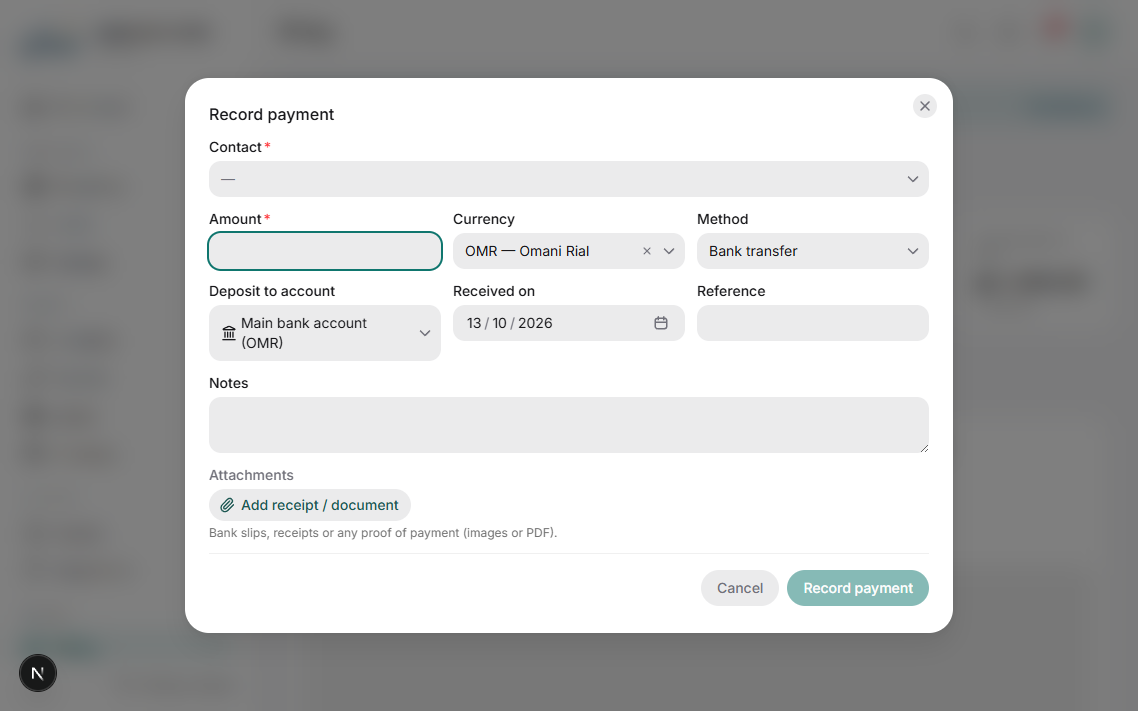
agency.payments.record- Open the invoice and press Record payment, or open the contact and press Receive payment to pay several invoices at once.
- Enter the amount, date, method (cash, bank transfer, card, cheque) and reference number. Choose the account the money went into (cash box, bank account).
- If the amount covers several invoices, allocate it; Boyoti proposes oldest-first. Over-payments stay as credit on the contact.
- Press Save. A numbered receipt is created, a bilingual receipt PDF is generated, and the tenant gets it by WhatsApp/email if enabled.
For cheques, record the cheque on the Cheques page instead — it is linked to the invoice and the payment is posted when the cheque clears.
Payments can be edited or voided by users with agency.payments.edit / void; voiding reverses the account transaction and reopens the invoice.
Was this article helpful?
Related articles
How invoices are generatedConceptBasicLease schedules, due dates, numbering, VAT and what happens when a lease changes.1 min readMoney accounts: cash, bank and trust accountsConceptBasicEvery payment, expense and payout is a transaction on an account — here is how to set them up.1 min readAccept online payments in the client portalHow-toProfessionalConnect a payment gateway so tenants pay invoices by card or Apple Pay from their phone.1 min read