

Concept1 min read·Updated Nov 2, 2026
Money accounts: cash, bank and trust accounts
Every payment, expense and payout is a transaction on an account — here is how to set them up.
Invoicing feature
Available from the Basic plan (OMR 39.00). Sign in to your agency to see whether your plan includes it.
BasicProfessionalUltimate
Requires permission
agency.accounts.viewAccounts represent where money physically is: the office cash box, each bank account, a card terminal settlement account, and optionally separate owner trust accounts if you hold client money separately. Every payment received, expense paid, salary posted or owner payout is a transaction on one of them, so balances are always live.
- Open Accounts and press New account. Choose the type (cash, bank, trust, gateway), currency and an opening balance as of a date.
- Mark one account as default for each payment method so staff rarely need to choose.
- Use Transfer to move money between accounts (e.g. cash deposited to the bank) and Adjust for corrections with a reason.
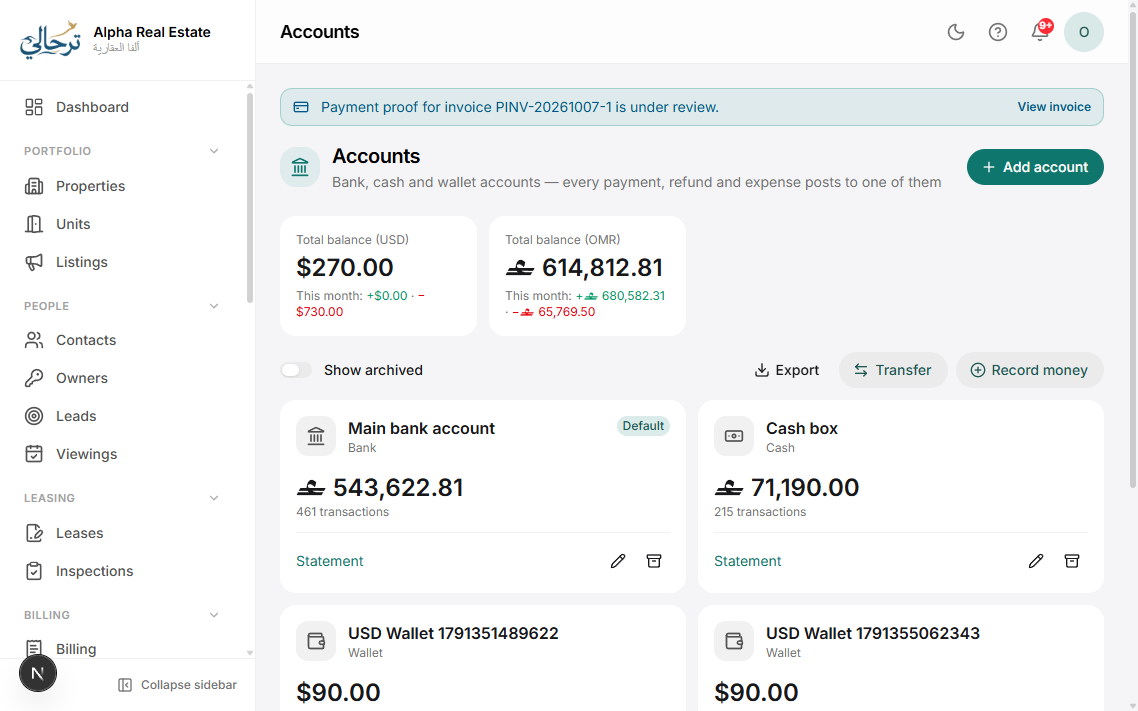
Each account page lists its transactions with running balance and links back to the invoice, expense or payroll run that created each one.
Was this article helpful?
Related articles
Record a payment and issue a receiptHow-toBasicCash, bank transfer, card or cheque — against one or several invoices, into a money account.1 min readSimplified accounting: categories, manual entries and period lockConceptHow Boyoti's lightweight ledger works and how to export to your accountant.1 min readGenerate owner statements and payoutsHow-toBasicMonthly statement per owner: collections, expenses, fees and net payout — PDF plus transfer.1 min read