

How-to1 min read·Updated Nov 2, 2026
Post-dated cheques: record, deposit, clear or bounce
Track every cheque from receipt to clearance, with reminders before deposit dates and bounce handling.
Post-dated cheques feature
Available from the Basic plan (OMR 39.00). Sign in to your agency to see whether your plan includes it.
BasicProfessionalUltimate
Requires permission
agency.cheques.createCheques are first-class records in Boyoti. Each one is linked to the invoice it pays and moves through a clear lifecycle.
| Status | Meaning |
|---|---|
| Received | In your safe, not yet deposited. Reminder sent X days before the cheque date. |
| Deposited | Handed to the bank; waiting to clear. |
| Cleared | Funds received — a payment is posted to the invoice and the account automatically. |
| Bounced | Returned by the bank — the invoice stays unpaid, a bounce fee can be invoiced, the tenant is notified. |
| Replaced / Cancelled | Swapped for another cheque or cash. |
- Add cheques in the lease wizard, or on Billing → Cheques → New cheque. You can scan the cheque with the camera: AI reads the number, bank, amount and date.
- On the deposit date, select cheques and press Mark deposited; choose the bank account.
- When the bank confirms, press Clear (or Bounce with the bank's reason).
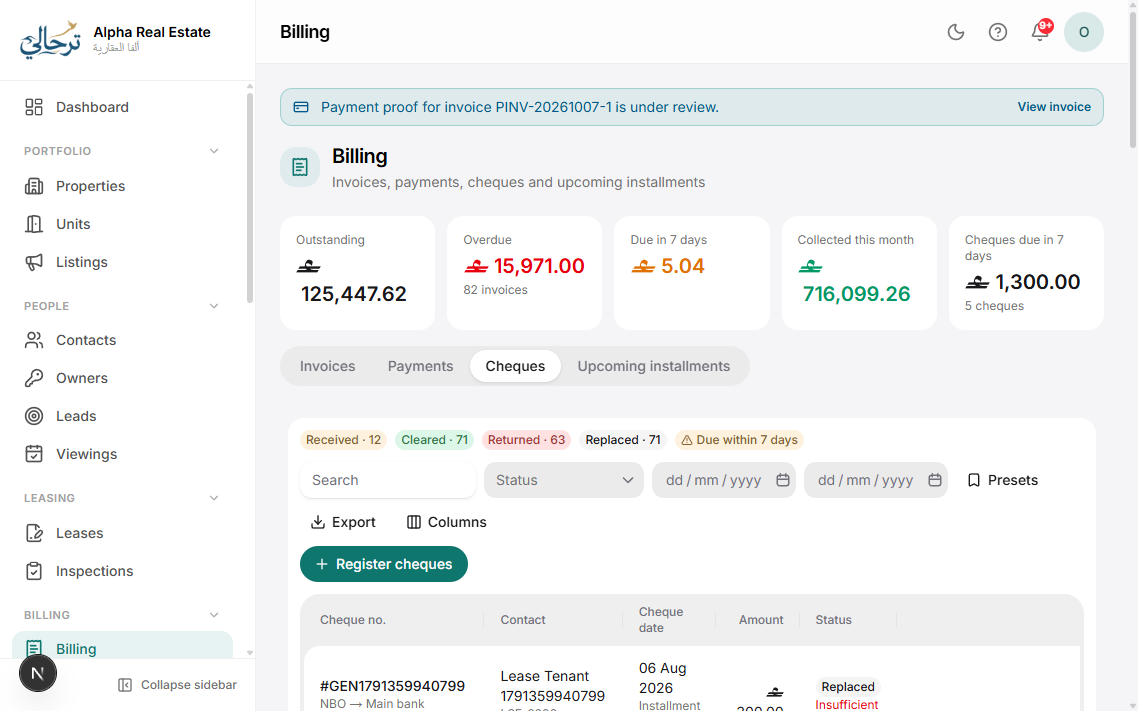
The Cheques page has a “Due this week” filter and an export for the bank deposit slip.
Was this article helpful?
Related articles
Record a payment and issue a receiptHow-toBasicCash, bank transfer, card or cheque — against one or several invoices, into a money account.1 min readPayment reminders and late feesHow-toBasicConfigure the reminder cycle before and after due dates, and automatic late-fee invoices.1 min readA cheque bounced — what now?TroubleshootingBasicRecord the bounce, charge the fee, notify the tenant and collect a replacement.1 min read