

How-to1 min read·Updated Nov 2, 2026
Add a contact (tenant, buyer or guarantor)
Create a person or company, capture ID documents and set their preferred language.
Requires permission
agency.contacts.createA contact is any person or company you do business with other than your staff and owners. The same contact can be a tenant on one lease, a guarantor on another, and later a buyer.
- Open Contacts and press New contact.
- Choose Individual or Company. For companies you can add authorised signatories later.
- Enter name (both languages if you have them), mobile number with country code, email and preferred language — every notification to this person uses it.
- Add ID details: national ID / passport number, nationality and expiry. Upload the scans; Boyoti can read the ID with AI to fill the fields for you.
- Save. The profile shows tabs for Leases, Invoices, Documents, Communications and Activity.
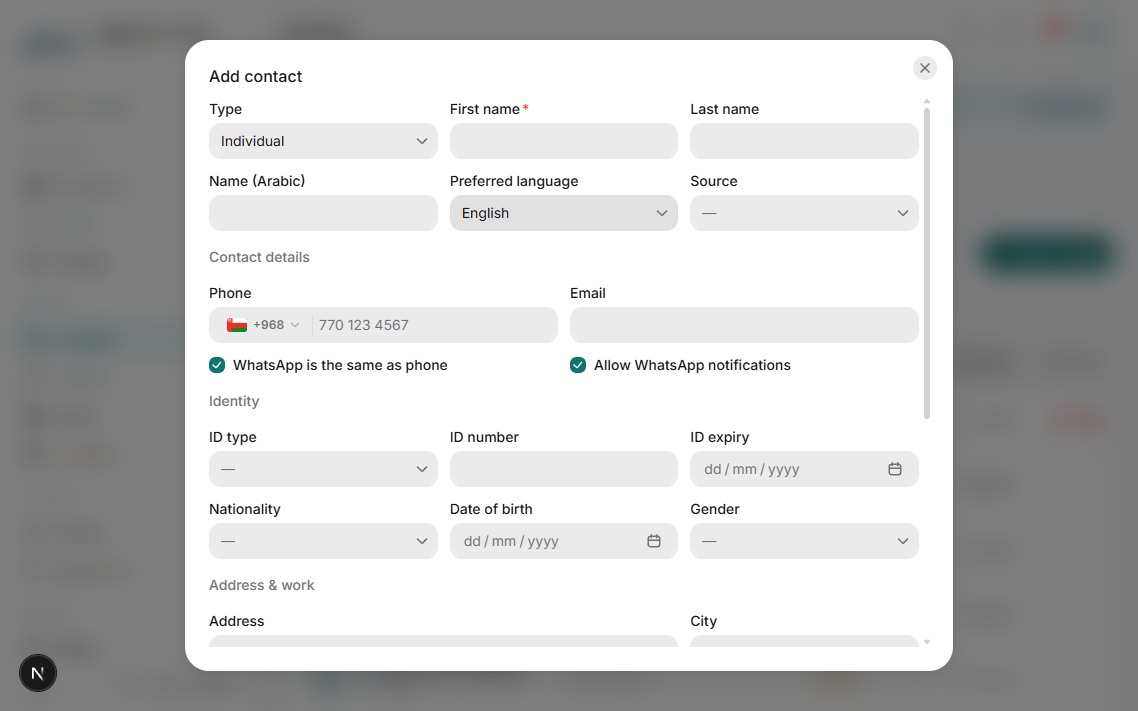
Mobile numbers are the key for WhatsApp. Enter them once correctly (e.g. +9665…) and Boyoti formats them for you.
Duplicate detection warns you if the phone or ID already exists so you can open the existing contact instead.
Was this article helpful?
Related articles
Give a tenant or buyer access to the client portalHow-toBasicSend a WhatsApp magic link or emailed credentials so clients can see invoices, pay and raise requests.1 min readCreate a leaseHow-toThe new-lease wizard: unit, parties, term, rent schedule, deposits, cheques and terms.1 min readContact roles, tags and blacklistingConceptHow roles are derived automatically and how to use tags and the blacklist.1 min read