

How-to1 min read·Updated Nov 2, 2026
Choose which notifications are sent and on which channels
Every event — invoice issued, lease expiring, leave approved — can be switched per channel for clients and staff.
Requires permission
agency.settings.notificationsSettings → Notifications shows a matrix: one row per event, grouped by module (Leasing, Billing, Maintenance, Payroll & HR, Portal…), and one column per channel — In-app, Push, WhatsApp, Email. Toggle any cell. A master switch per row disables the event entirely.
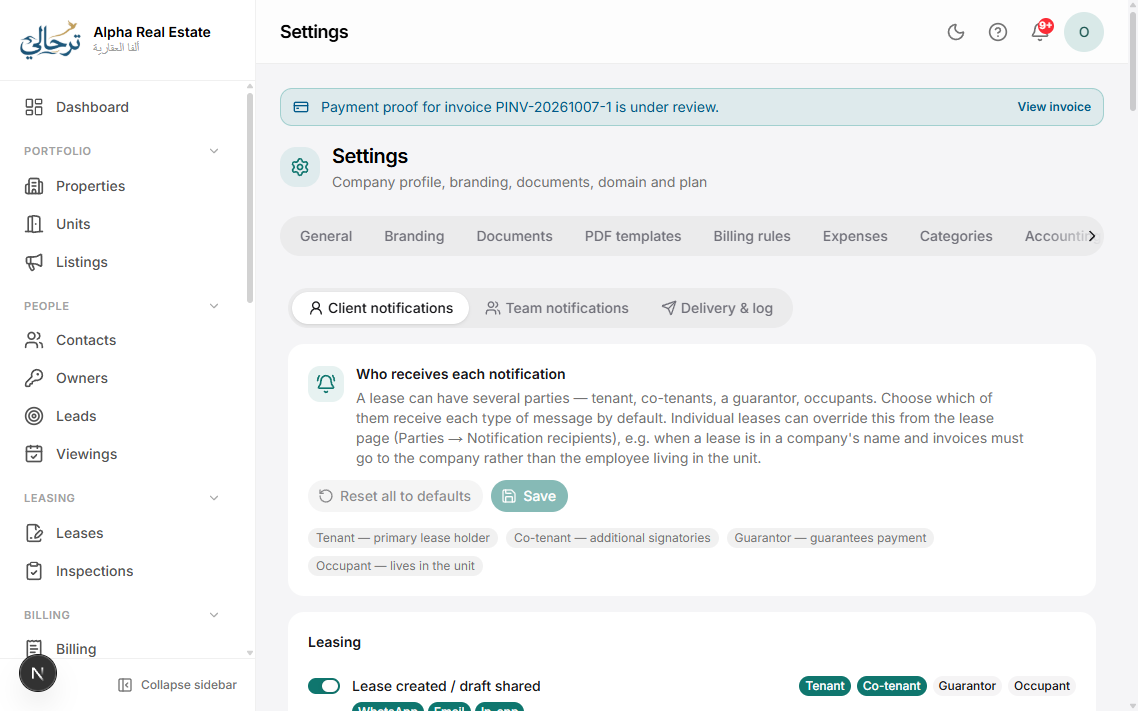
- Client events go to tenants/buyers/owners (invoice issued, payment received, cheque due, lease expiring, maintenance update…).
- Staff events go to the responsible staff or roles (new lead assigned, expense awaiting approval, payroll approved, leave requested…). Choose recipients per event: assignee, role(s), or specific users.
- Quiet hours: WhatsApp and push are held until morning in the agency timezone if sent during quiet hours.
Hover an event for a preview of its message in both languages.
Was this article helpful?
Related articles
Connect WhatsApp and emailHow-toProfessionalEnable the WhatsApp Business channel and a branded email sender so every notification reaches clients.1 min readPayment reminders and late feesHow-toBasicConfigure the reminder cycle before and after due dates, and automatic late-fee invoices.1 min readMessage templates and short linksHow-toHow WhatsApp/email wording is managed, which variables you can use and why links are shortened.1 min read