

Overview1 min read·Updated Nov 2, 2026
Owner portal overview
What an owner sees: only their properties, in view-only mode, on any device.
Owner portal feature
Available from the Basic plan (OMR 39.00). Sign in to your agency to see whether your plan includes it.
BasicProfessionalUltimate
Requires permission
agency.owners.viewOwners log in from the universal login page (Client / Owner tab) and land in a portal scoped strictly to the properties you assigned to them. Everything is read-only; they can download but never change.
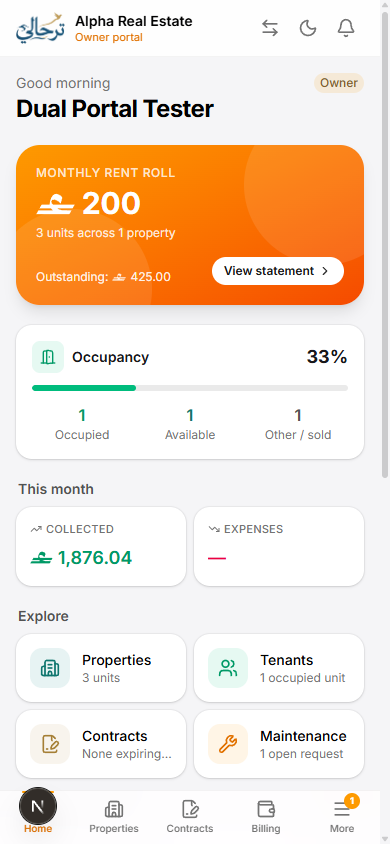
| Section | Shows |
|---|---|
| Overview | Occupancy, rent collected this month, outstanding, next payout, alerts (expiring leases, open maintenance). |
| Properties & units | Each property with units, status, current tenant and rent. |
| Tenants & leases | Active and past leases with contract PDFs. |
| Billing | Invoices and payments on their units; cheques status. |
| Expenses & maintenance | Costs charged to their properties with receipts and photos. |
| Statements | Monthly statements and payout history with PDFs. |
| Documents | Title deeds, management agreement and anything you share. |
An owner who is also a tenant can switch to the client portal from the top bar — one account, two views.
The owner portal is gated per plan, with a limit on the number of owner accounts and overage beyond it.
Was this article helpful?
Related articles
Create an owner and assign their propertiesHow-toBasicOwners page: profile, management fee, bank details and the properties you manage for them.1 min readInvite an owner to the owner portalHow-toBasicWhatsApp login link or emailed credentials; what owners can see once inside.1 min readGenerate owner statements and payoutsHow-toBasicMonthly statement per owner: collections, expenses, fees and net payout — PDF plus transfer.1 min read