

How-to1 min read·Updated Nov 2, 2026
Handle a maintenance request
From the tenant's report in the portal to assignment, vendor work, cost and closing with photos.
Maintenance feature
Available from the Basic plan (OMR 39.00). Sign in to your agency to see whether your plan includes it.
BasicProfessionalUltimate
Requires permission
agency.maintenance.editTenants report issues from the client portal (with photos and a preferred visit time); staff can also log requests on their behalf. Each request has a category, priority, unit and a status.
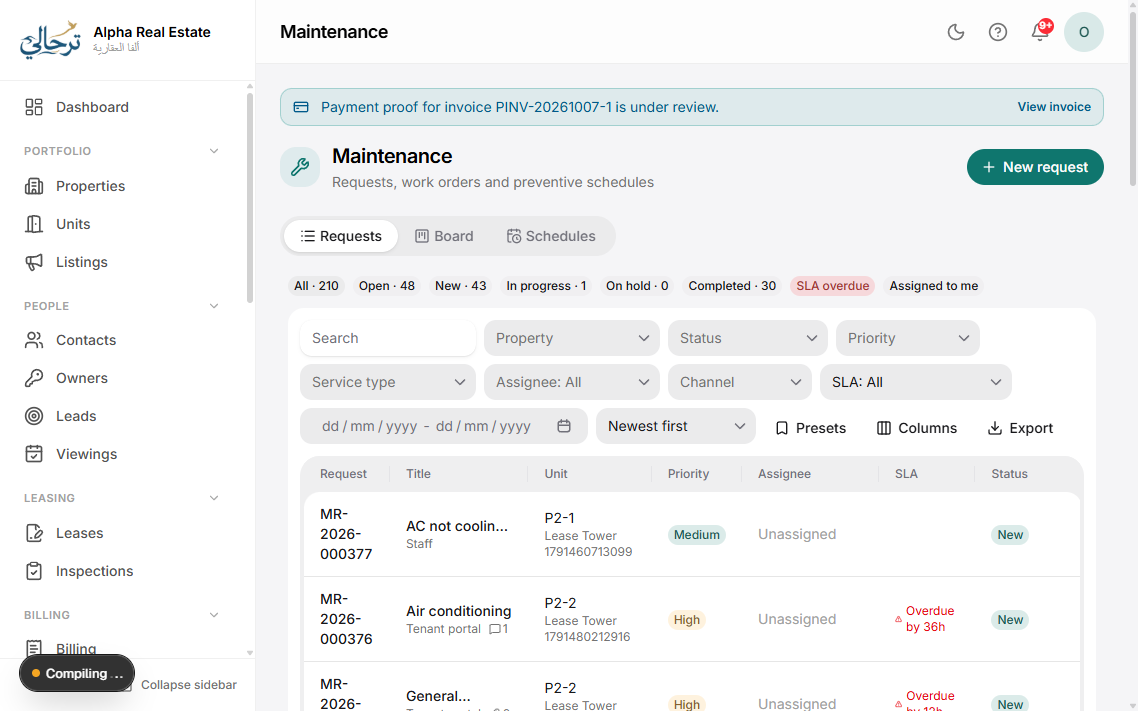
- Open Maintenance. New requests appear under Open; press one to see photos, the unit's history and the tenant's contact details.
- Set the priority and assign it to a staff member or a vendor. Optionally schedule the visit — the tenant is notified and can confirm.
- Move to In progress when work starts. Add notes, photos and the quote/cost. If the cost is chargeable to the tenant, tick Bill tenant to create an invoice; otherwise it becomes an expense on the property (and shows on the owner statement).
- Press Resolve. The tenant is asked to confirm and rate; after confirmation (or 3 days) the request closes.
SLAs
In Settings → Maintenance set response and resolution targets per priority. Overdue requests are highlighted and escalated by notification to the manager.
Recurring preventive maintenance (AC service, pest control) can be scheduled as repeating tasks that create a request automatically.
Was this article helpful?
Related articles
Vendors and contractorsHow-toBasicKeep a directory of vendors, assign them work, track their invoices and performance.1 min readRecord an expense and get it approvedHow-toBasicExpense claims with receipts, categories, approval workflow and reimbursement.1 min readClient portal overviewOverviewBasicA mobile-first portal where tenants see leases, pay invoices, report maintenance and download documents.1 min readTeam tasks and the task boardHow-toBasicAssign to-dos to staff with due dates, link them to records, and follow them on a Kanban board.1 min read