

The leads pipeline
Stages, sources, assignment and the kanban/list views.
Leads & viewings (CRM) feature
Available from the Basic plan (OMR 39.00). Sign in to your agency to see whether your plan includes it.
agency.leads.viewOn this page
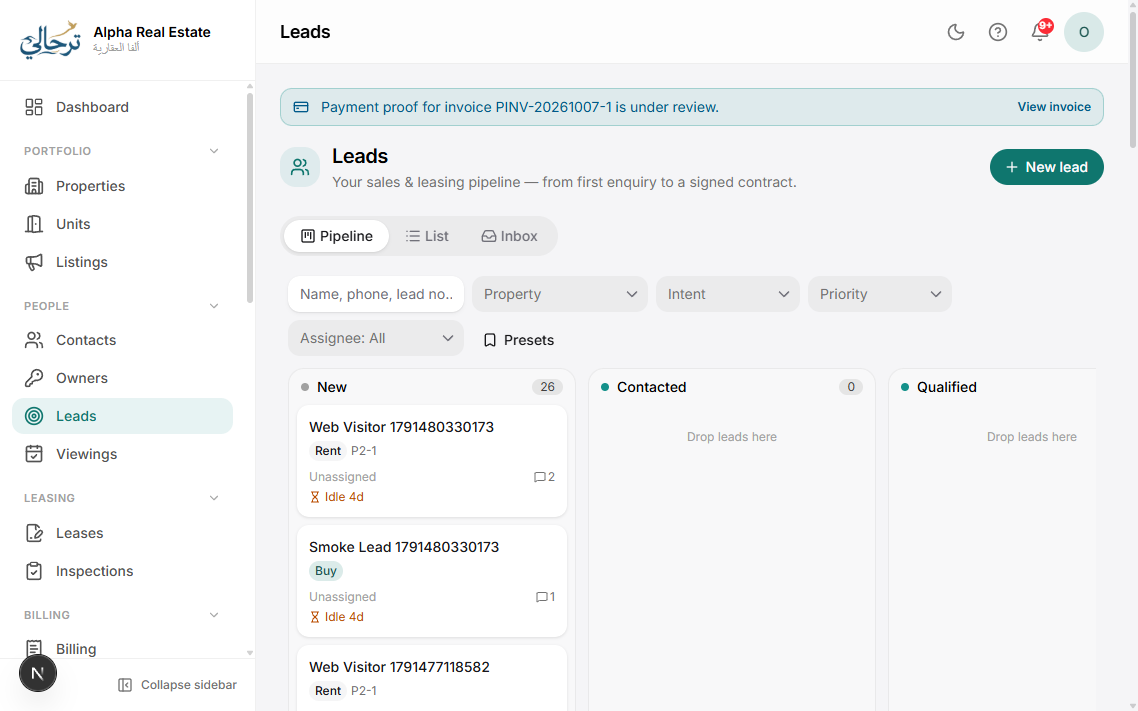
Leads are enquiries that may become tenants or buyers. They arrive from your website forms and listing pages automatically, from WhatsApp conversations, or you add them by hand (walk-ins, phone calls, portals).
Stages
New → Contacted → Qualified → Viewing → Negotiation → Won / Lost. Drag cards between columns or change the stage on the lead. Stage names can be renamed in Settings → CRM.
Assignment
Leads can be auto-assigned round-robin to agents, or assigned manually. Agents with only leads.view see their own leads; leads.view_all shows everyone's.
Requirements
Record what the lead is looking for (rent/buy, type, budget, bedrooms, areas). Boyoti suggests matching vacant units on the lead page so you can propose them with one tap.
Set a next follow-up date on every lead. Overdue follow-ups appear on your home dashboard and in the daily digest.
Was this article helpful?