

Overview1 min read·Updated Nov 2, 2026
Your agency website and the page builder
Landing page sections, theme, navigation, SEO and the built-in units page.
Public website feature
Available from the Basic plan (OMR 39.00). Sign in to your agency to see whether your plan includes it.
BasicProfessionalUltimate
Requires permission
agency.website.editEvery agency gets a public website at yourname.boyoti.com with a landing page, a Units page fed by your listings, a contact form that creates Leads, and the login entry for clients and owners.
Editing the landing page
- Open Website. The left panel lists the page sections (hero, featured units, services, about, testimonials, FAQ, contact…). Drag to reorder, toggle the eye to hide.
- Click a section to edit its texts (both languages), images and options in the side panel. The preview updates live.
- Under Theme choose colours, corner radius and fonts. Under Navigation edit the menu and footer links.
- Under SEO set the site title, description, social image and per-page metadata.
- Press Preview to open the draft, then Publish to go live. Drafts never affect the live site until published.
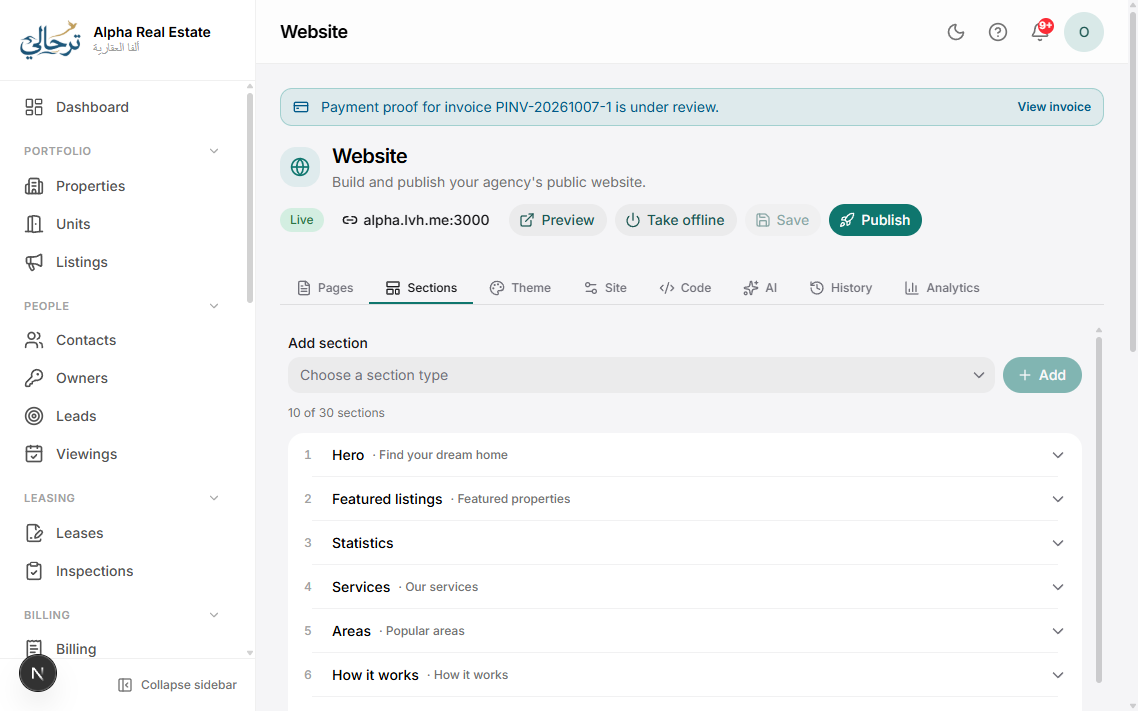
The basic website is included with the Website feature. Drag-and-drop section editing needs Website builder; custom fonts and custom code (CSS/JS/head tags) are separate add-ons on higher plans.
Use the AI button in any text field to rewrite or translate the copy in the agency's tone.
Was this article helpful?
Related articles
Connect a custom domainHow-toUltimateServe your website and portals from www.youragency.com with automatic HTTPS.1 min readPublish a unit as a public listingHow-toBasicPhotos, description, price and amenities — then one click to go live on your site.1 min readSEO and AI-search (GEO) for your websiteConceptBasicWhat Boyoti does automatically for Google and AI assistants, and what you should fill in.1 min read